
If you can’t find an answer here, send me a message via the contact page and I will help you personally.
How To Use The Paper Texture Library
What is an Art Surface?
Unlike the flat Jpegs, The Art Surfaces (AS), sometimes referred to as “Smart Surfaces” are multi layered smart paper templates that add surface lighting and shadows live as you paint in them. You can also paste in any artwork and the surface will be applied.
How do I download free Procreate Art Surfaces?
For now, all 1K Procreate Art Surfaces are free to download! All you have to do is register and reload the page and the Procreate 1K Art Surfaces button will become activated.
2K and 4K Art Surfaces require a Pro membership.
How do I Use The Procreate Art Surfaces Paper Textures?
Follow this video tutorial to use the Procreate paper texture Art Surfaces on your iPad.
The short version is:
- Download the Art Surface on your iPad
- Open it in Procreate
- Paint in the layer called “Paint Here”
How do I use the Photoshop Art Surfaces?
Until I create a proper manual and tutorials for the Paper Texture Company Art Surfaces please refer to the GrutBrushes Art Surfaces manual and tutorials here.
The principles and practices are the same, the three main differences are:
- GrutBrushes Art Surfaces have 5 to 9 different surface types while Paper Texture Company uses 3: Basic, Glossy, and Subtle. Procreate Art Surfaces only come in one style.
- Paper Texture Company Art Surfaces are 4k (GrutBrushes are 2K)
- The layers have different names.
How do I Tile the papers?
Jpegs: Copy any image and place it exactly to the left, right, above or below itself and it will tile seamlessly in all directions.
PSD: They are already pre-tiled “infinite canvasses” and you just reveal as much or as little of it as you want. Use the crop tool to drag outside the boundaries and the entire template will automatically extend to any size or aspect ratio you drag it out to.
Procreate: (See Video Tutorial below) This is quite a bit more complicated because you have to duplicate each layer and position it alongside the original layer but since they are already 4K, you probably won’t need to tile them.
Keep in mind as well that if you tile a 4K file in Procreate, you are restricted to 4 layers on most iPads, and the Art Surfaces already have more than that. There are no limits other than available RAM in Photoshop.
How To Tile An Art Surface Paper Texture in Photoshop (Tutorial)
The tutorial above will teach you how to resize a seamless paper texture Art Surface in Photoshop. This uses the magical infinite canvas abilities of the Art Surfaces to scale to any dimension or aspect ratio you need.
How To Tile A Seamless Paper Texture in Procreate (Tutorial)
The tutorial above will teach you how to resize a seamless paper texture Jpeg in Procreate by tiling it. Since the edges are all seamless and infinitely tileable, you can tile
How To Use a Photoshop Art Surface in Clip Studio Paint
If you make two small adjustments you can import the Photoshop Art Surfaces PSD files into CSP.
- Change the folder type from “Through” to “Normal”.
- Adjust the lighting layers until the texture works for your needs.
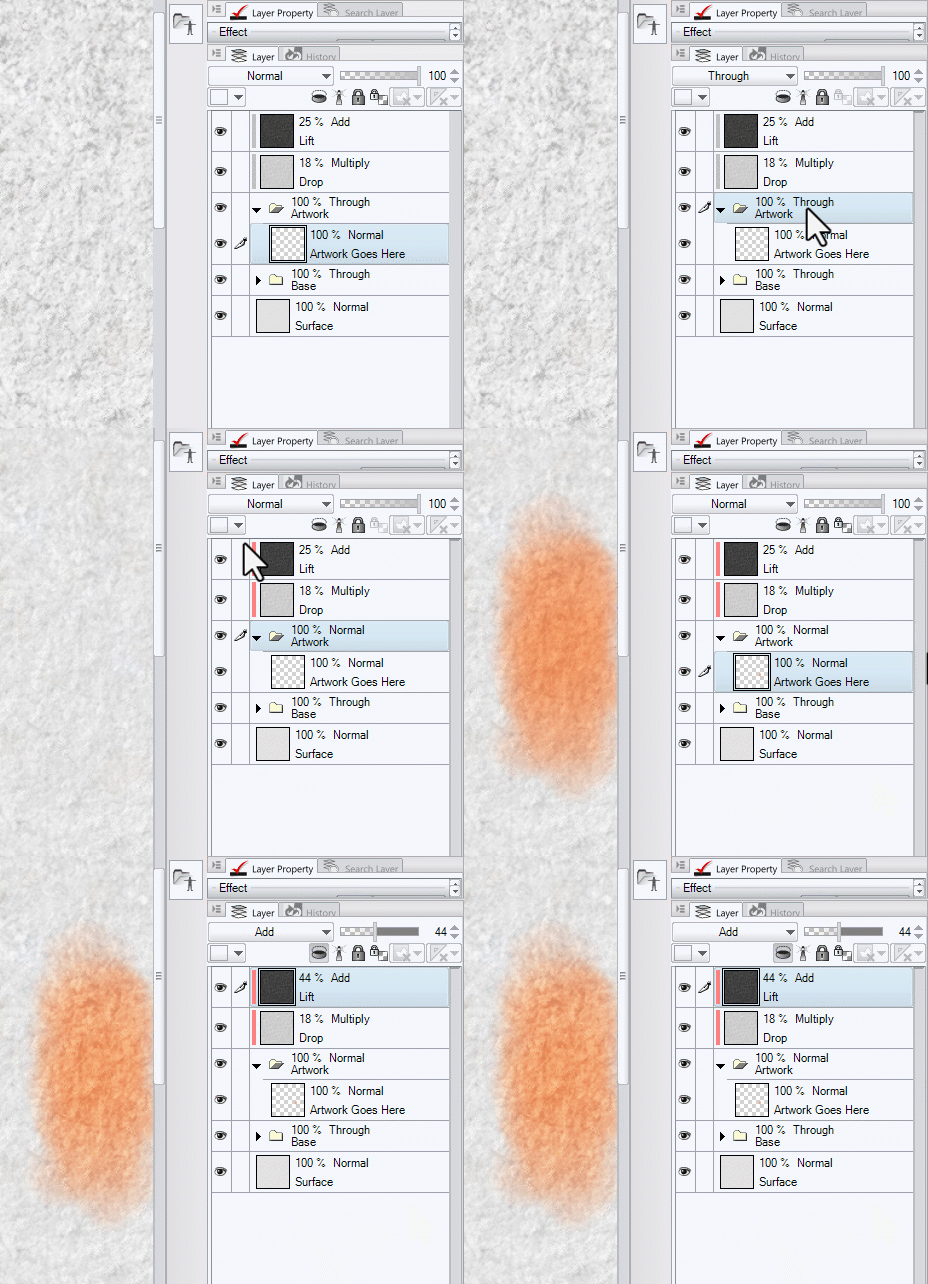
Unfortunately the infinite canvas auto-scaling that works in Photoshop doesn’t work in CSP as it doesn’t support the tiled texture layers nor does it support the Layer Comp features, but you do get the layered template file with the lighting and shadow separated into their own layers for maximum control.
Why Can’t I just paste the texture layer on top and set it to Multiply?
You can! And that is a great quick way to get a paper texture on any artwork, and the Paper Texture Company Jpegs are perfect for that.
The Art Surfaces have separate lighting and shadow layers which have been created specifically for those purposes and they have been tweaked to provide an appealing, balanced surface texture which can be applied to most uses without any further adjustment.
The individual luminance ranges have been calibrated to best show the texture over as wide a luminance range possible without being overbearing and distracting from your artwork.
Light and shadow being separate also gives you maximum control over where you want the texture to be most visible, and allows adjustment of each individually as you see fit, for darker or lighter materials.
I tried to register but I didn’t get the confirmation code
Some email hosts are blocking them, especially yahoo. You can send me an email from the email address you want to register and I will register you manually. That will send you an email to set a password and then you’re in!